



Lowering Compressed Air Costs: Three Key Metrics to Watch
February 4, 2026
What Readings Tell You It’s Time for Air Compressor Maintenance?
February 18, 2026Air Compressor Reliability: What Readings Should You Be Watching?
By John Wilkerson, Technical Training Manager | February 11, 2026 | Uncategorized

Reliability matters: Entire batches of products must be discarded when a compressed air system fails in a bakery.
Reliability is a primary concern for compressed air users, for good reason. The technology is mission-critical in many companies. And the failure of a compressed air system may mean lost hours, lost product or even a complete plant shutdown.
As we’ve written in the past, compressed air reliability requires a variety of choices from choosing the right air compressor, the right oil, and the right storage to managing pressure, heat removal and controls (especially VSDs).
Recognizing the complexity of these challenges, we’d like to provide a list of critical measurements you can monitor to keep your rotary screw air compressor running reliably and safely.
We’ll start with temperature.
Start With the Numbers That Matter: Isentropic Energy Ratings and Specific Power
| Metric | Key Idea |
|---|---|
| 1. Temperature | Ideally, an oil-flooded rotary screw air compressor is running at its sweet spot of 180°F. |
| 2. Amperage | A spike in amperage, the electrical current flowing to the compressor, warrants further investigation. |
| 3. Load hours and run hours | Make sure the load hours (the time your air compressor is producing air) are more than 50% of the run hours (how long your compressor is operating). |
| 4. Load/unload cycles and motor starts | Your goal is to keep load/unload cycles and motor starts to a minimum. |
| 5. Vibration | While it may be something as simple as a change in ambient temperature, excessive vibration should never be ignored. |
Measurement No. 1: Temperature
Regularly monitoring the temperature of an oil-flooded rotary screw air compressor can help you catch problems before they escalate, ensuring your system stays reliable and efficient. Specifically:
- If it’s too high (above 180°F), it can lead to a host of issues, including reduced efficiency, increased wear and tear, and ultimately, premature failure.
- If it’s too low (below 150°F), water can form, displacing the oil in your compressor. The lubricants break down, leading to increased friction and potential damage.
Ideally, your compressor temperature is running at 180°F. The goal is to keep your compressor in its sweet spot, where it’s not too hot and not too cold. Just right.
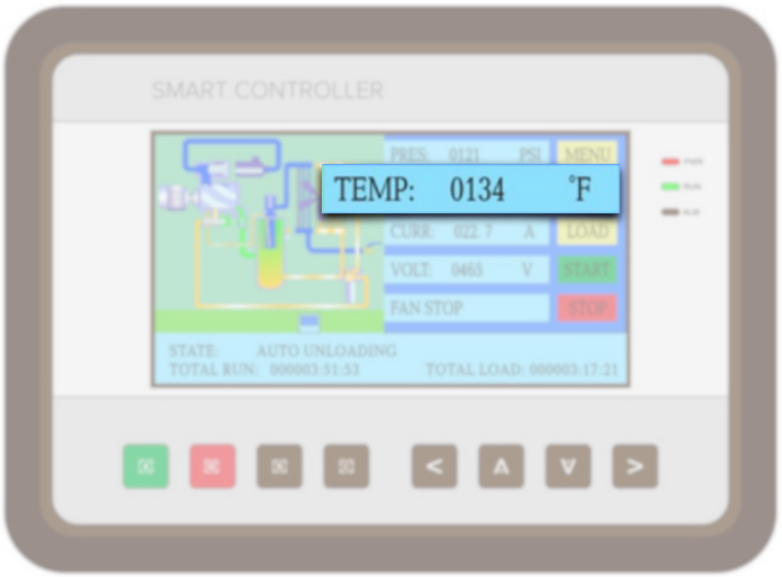
A Kaishan compressor displays temperature readings on its controller, allowing you to tell at a glance whether it is running in its sweet spot around 180°F (or not, like this one).
To keep an eye on this crucial measurement, consider installing temperature sensors that will alert you when the compressor's operating temperature exceeds safe limits.
If your compressor is running outside those parameters for more than a day or so, it’s smart to call in your compressed air professional.
One great tool that our customers are using to great advantage is thermal imaging equipment. Starting at prices under $500, these devices can help you detect hot spots in any equipment (not just compressors), making them a critical tool for maintenance.
Measurement No. 2: Amperage
Amperage measures the electrical current flowing to the compressor. So it’s important to monitor the readings closely and spot fluctuations that could signal potential problems early.
If you notice a spike in amperage, it might be time to investigate further. Consistently high readings indicate overheating and possible motor damage, so it’s crucial to address them promptly.
Additionally, keeping your compressor’s electrical systems in check can reduce energy costs, extend the unit's lifespan and improve overall efficiency.
In addition to amperage, you can also see all three phases of power, so you can verify that the incoming power feeds are delivering the same level of energy. If those sources of energy become unbalanced, you lose contactors, wires melt and motors burn out.
Measurement No. 3: Load and Run Hours
Load hours represent the time your air compressor is actively producing compressed air, while run hours include all the time the compressor is operational, whether under load or not.
If the load hours on your compressor are less than 50% of the run hours, your compressor is idling too much. Excessive idling could indicate that your system is oversized for your needs, leading to inefficiencies. Water may condense out of the oil, increasing the risk of low oil pressure and bearing damage.
In addition, while you’re monitoring run hours, you’ll want to pay attention to your service intervals and make sure your maintenance is up to date.
Measurement No. 4: Load/Unload Cycles and Motor Starts
It would be ideal if you could turn on your compressor and run it without unloading until you reach your 2,000-hour service review.
So, your goal is to keep load/unload cycles to a minimum. There’s no target to reach, other than zero. Learn more about “How Often Should an Air Compressor Cycle?”
Similarly, you want to reduce the number of times your compressor’s motor starts running. Different manufacturers publish their recommendations, based on actual data, but the main objective is to reduce the number of times your motor kicks on. That reduces wear and tear on the motor and prolongs equipment life.
Measurement No. 5. Vibration
Vibration can be a key indicator of your compressor’s overall health and performance in your facility.
In rotary screw compressors, excessive vibration could indicate problems in the airend or motor. So you’ll want to establish a baseline with an alarm if there’s a deviation from the norm.
Excessive vibration should never be ignored. For more details, read our blog post, “Diagnosing Air Compressor Vibration Issues: Tips for Technicians.”
Reliability Issues Front and Center
Every Kaishan compressor displays all relevant operational data on the screen of your compressor controls: pressure, temperature, voltage and any amps that are present.
Unfortunately, most other compressor manufacturers do not display the power consumption on the screen the way we do.
For us, it’s primarily a safety issue. We believe it’s important that you know how much power your compressor is consuming (since actual measured motor amps is one of the first diagnostic steps we do).
Even if you don’t monitor the system remotely, you can determine if there’s a problem simply by looking at the screen. If it usually runs at 100 amps and suddenly it's running at 120, you know your compressor is using more energy than normal.
You shouldn’t have to stop production or even open the control panel to have that critical information. More proof that we do everything we can to help you operate our equipment safely.
And if you want to keep an eye on key parameters and receive notifications via text, you can monitor your compressor remotely through the Internet of Things. We offer options like AirWatch, which digitally creates an online twin using Modbus protocol to display pressure, temperature, faults, status and other key indicators. (For more on remote monitoring, see our blog post, “Air Compressor Monitoring Tools for a Smart Factory.”)

Downtime costs the automotive industry $2.3 million per hour, according to Siemens. That’s $600 per second. And it gives air compressor reliability top-of-mind awareness.
Develop a Compressed Air System Maintenance Plan
Monitoring critical compressor metrics closely is the first step in ensuring the reliability of your compressed air system. The second step is acting promptly on any deviations you find.
Consistent maintenance is key to ensuring the reliability of your compressed air system. Some best practices include:
- Regular inspections. Schedule routine inspections to check for leaks, wear, and overall system performance. Early detection can prevent bigger problems down the line.
- Filter changes. Keep your air filters clean and replace them regularly. Clogged filters can restrict airflow and lead to inefficiencies.
- Lubrication. Ensure that your compressor is properly lubricated. Check oil levels and replace oil as recommended by the manufacturer. And have oil samples analyzed every 2,000 hours (1,000 hours for food-grade applications).
- Monitoring systems. Invest in monitoring systems that can provide real-time data on temperature, pressure and amperage. Remote monitoring can help you catch issues immediately. If cost is a problem, you’ll want to do it the old-fashioned way, logging key parameters every day on a sheet of paper.
By staying on top of these practices, you can greatly enhance the reliability of your air compressor and minimize the risk of costly downtimes.
For more specific suggestions, we’ve compiled ten rotary screw air compressor maintenance tips. We have also created a comprehensive air compressor maintenance guide.
These guidelines are a good place to start your efforts to improve reliability. You’ll make even greater strides, however, if you find a compressed air consultant you can trust.
Choose a Good Business Partner
In many ways, choosing the right compressed air consultant is one of the most important things you can do to enhance the reliability of your compressed air system.
They can help you decide which measurements you should be tracking to build compressed air reliability and prevent downtime in your facility. Find out more about how the right compressed air consultant can save time and money and reduce downtime by downloading our white paper, “The Top 25 Reasons an Independent Air Compressor Distributor Enhances Compressed Air Performance.”
We recognize that we cannot be out in the field with every customer, all the time. But we do the next best thing: we partner with a nationwide network of independent distributors, who are located in your local community or region.
They provide the on-site help and consultation you need to keep your compressed air system running reliably. They have factory-trained air compression experts who can service your air compressor system without a problem.
We partner with these independent, local businesses because it's the best way to serve you. Our distributors offer expert guidance, faster response times and personalized support tailored to your needs. They don't just sell compressors—they build relationships, ensuring you get the right system, reliable service and quick access to parts when you need them most.
With factory-trained technicians and a deep understanding of industrial applications, they help maximize efficiency and minimize downtime. So, when you buy through Kaishan, you're getting more than a product—you're getting a local partner who cares about your business and wants to help you succeed.
Key Takeaways
1. Temperature. Your compressor’s sweet spot is 180°F.
2. Amperage. An increase in amperage warrants further investigation.
3. Load and run hours. Make sure the load hours are more than 50% of the run hours.
4. Load/unload cycles and motor starts. Keep load/unload cycles and motor starts to a minimum.
5. Vibration. While some vibration is normal, excessive vibration should never be ignored.
Let Us Help
Ensuring reliability is critical to the operation of your compressed air system and to the processes that rely on it. If you need help deciding what compressed air reliability measurements to track, get in touch with the experts at Kaishan. Contact us today.
Frequently Asked Questions
Listen to the Podcast Version



Why Compressor Reliability Lives and Dies on a Few Numbers
What's up, everyone?! You’re listening to The Big Dog Podcast. I’m Jason Reed, and if you’ve ever been the one standing in a hot compressor room at 2 a.m. during a shutdown, this episode is for you.And I’m Lisa Saunders. Today we’re talking about why your rotary screw compressor’s reliability basically lives and dies on a handful of numbers sitting right there on the controller.
Yeah, this isn’t theory. Compressed air is a mission‑critical utility. It’s not “just another asset” sitting in the corner. If that air goes away, lines stop. You lose hours, you lose product. In some places, you lose the whole plant for the day.
Think about a bakery. If that oil‑flooded rotary screw goes down mid‑run, and you can’t keep pressure or you contaminate the air, you can end up scrapping entire batches. That’s ingredients, labor, packaging, all in the dumpster.
Or automotive. Siemens has pegged auto downtime at something like $2.3 million an hour. That’s roughly $600 a second. You don’t have to be an automotive plant to feel the pain though. Even one production hour lost in a smaller facility is brutal.
And the thing is, most of those “surprise” failures were not actually surprises. The controller was telling the story days or weeks ahead of time. People just weren’t watching the right numbers or the trends.
That’s the whole point of today. On a rotary screw, especially an oil‑flooded industrial unit, there are five key readings that tell you probably 80 percent of the reliability story: temperature, amperage, load hours versus run hours, load/unload cycles and motor starts, and vibration.
Five things. If you’re driving or walking the plant right now, just mentally picture your main compressor controller. On a Kaishan, that smart controller screen will show you pressure, temperature, amps, voltage, operating state, total run hours, total load hours… all right there.
Yeah, you don’t need to crack open a panel or grab a meter just to get the basics. You can walk up, see: “Okay, pressure’s good, temp is 178°F, amps are around 100, state is loaded, total run versus load hours look normal.” That’s your quick health check.
Couple details for folks who don’t stare at these all day. “Run hours” is how long the machine has been operating, period. “Load hours” is how long it’s actually making air. We’re gonna come back to why that ratio matters a lot.
And then amps, that’s your electrical current draw. On Kaishan gear, you see that right on the screen. A lot of other compressors don’t show you that, which is wild, because measured motor amps is one of the first diagnostics anybody serious about reliability looks at.
The other big idea here: trends beat snapshots. One weird reading on a Monday morning? Could be ambient temp, could be a weird demand spike. But if you see temperature creeping up over a week, or amperage running 15–20 percent higher than your normal baseline, that’s the red flag.
Exactly. Same thing with vibration or starts. You’re not just asking, “What’s the number today?” You’re asking, “Is it different from last week?” That’s where logging or remote monitoring really pays off. We’ll get there in chapter three.
So hang on to those five: temp, amps, load versus run hours, cycles and starts, and vibration. Next up, we’re gonna break each one down in plain English and talk about what real‑world problems they’re warning you about.
The Big Five Metrics and How to Read Them
Let’s start with temperature, because if you get that wrong, everything else gets messy fast. On an oil‑flooded rotary screw, your normal operating window is roughly 150°F to 200°F, and the sweet spot is right around 180°F.So if you walk up to the controller and it says, say, 178, 182, somewhere in there, you’re basically in that “Goldilocks” zone. Not too hot, not too cold.
Yeah. You go too hot, you’re up past that 180 mark and living toward the top of the range all the time, now you’re cooking the oil, you’re reducing efficiency, you’re driving wear and tear. Keep doing that and you’re inviting premature failures.
And if it’s too cold, that’s sneaky. Below about 150°F, you start forming water in the system. That moisture can displace the oil, so your bearings and rotating parts aren’t getting proper lubrication. Oil starts to break down, you get low oil pressure and, over time, bearing damage.
Yeah, everybody worries about “overheating,” but a cold compressor that never gets up into that 180°F range will quietly wreck itself. So, if you see temps sitting low day after day, that’s not “nice and cool,” that’s a problem you gotta chase.
Field trick here: a lot of folks are picking up low‑cost thermal imaging cameras now. You can get them for under 500 bucks. Point it at the compressor, the motor, the cooler. Hot spots jump out at you, and not just on compressors—any equipment.
Alright, second metric: amperage. That’s the current feeding your motor. On a Kaishan controller you’ll see it right on the screen along with the volts. If you know that machine usually runs at, say, 100 amps at full load, and now you’re at 120 for the same pressure and flow, something changed.
Could be mechanical drag, could be a restriction, could be something with your airend. The point is, a spike or a steady creep in amps is your cue to investigate before wires start melting or a motor cooks itself.
And because you can see all three phases of power, you can spot if they’re out of balance. You don’t need to be an electrician to see that one leg is way off. Phase imbalance is how you lose contactors and burn up motors.
Okay, third bucket is load hours, run hours, and then how often the thing is loading and unloading. If your load hours are less than half your run hours, that compressor is sitting there idling way too much.
Yeah, so if you’ve got 10,000 run hours and only 3,000 load hours, you’re under that 50 percent mark. That usually means you’re oversized or the system controls aren’t set up right. You’re burning energy, you’re not keeping the oil hot enough, and again, you can end up with water condensing in the oil.
On top of that, you want as few load/unload cycles and motor starts as possible. Ideal world? You turn the thing on, it runs loaded until the 2,000‑hour service. Reality’s messier, but the target is “as close to zero cycles and starts as you can get.”
Every start and every big pressure swing is stress. Manufacturers put limits out there, but if you’re hearing that compressor starting and stopping all day long, that’s short‑cycling. You’re chewing up the motor and the starter for no benefit.
Last one: vibration. Even if you don’t have a fancy system, you can set a baseline. Take a simple reading when the machine’s healthy. Or at least get used to how it feels and sounds when it’s right. Then, any increase from that baseline—especially in the airend or motor—should get your attention.
Excessive vibration is the machine yelling at you. In a rotary screw, that can be airend issues, misalignment, bearing problems. If you ignore it, you don’t just get a noisier compressor. You eventually get hard failures, broken components, maybe even safety hazards.
So those are the big five: temp in that 150–200°F window with a 180°F sweet spot, amps and power quality, load versus run hours and cycles, and vibration. Next we’ll talk about turning those readings into a simple, repeatable reliability program.
Turning Readings into a Reliability Program
Alright, so you’ve got your five metrics. Now the question is, how do you actually bake them into your day‑to‑day so you’re not just reacting when something breaks?Let’s start simple. Daily and weekly routines. If you don’t have remote monitoring, do it the old‑fashioned way: walk up to the controller and log the key numbers once a shift or once a day—pressure, temperature, amps, run hours, load hours. Put it on a sheet of paper or a basic spreadsheet.
Yeah, it doesn’t have to be fancy. Write down: “Monday, 7 a.m., 178°F, 102 amps, run hours X, load hours Y.” After a couple of weeks, you can see trends. Is temperature climbing? Are amps drifting up? Is that load‑to‑run ratio falling under 50 percent?
Same with vibration. You can get a low‑cost vibration tool, or at least standardize, “This is how it normally feels and sounds.” If you’re serious, set a baseline reading and an alarm level so you know when it’s deviating from normal.
And don’t forget that thermal imaging camera we talked about. Work it into your PMs every few months. Quick scan across the compressor, the motor, the cooler. Any weird hot spot is an invitation to look closer before you have a failure.
On the maintenance side, tie those five metrics into your PM checklists. When you’re changing filters, checking oil, doing your 2,000‑hour service—or 1,000 hours if it’s a food‑grade application—make sure someone is also looking at those logs and asking, “Did any of these numbers drift?”
Now, if you’re ready to level up, this is where remote monitoring and IoT tools come in. With something like Kaishan’s AirWatch, you can pull data like pressure, temperature, status, faults—basically build a digital twin of that compressor over Modbus and watch it online.
And the value isn’t just a cool dashboard. It’s alarms and notifications. If temperature runs outside that safe band, or amps jump, or you get a fault, you can have it send a text or feed into your maintenance system so someone reacts quickly instead of finding out when a line goes down.
Exactly. You don’t need 200 alerts for noise either. The ones that matter are: high temp, high amps, abnormal vibration if you’ve got sensors, and patterns that say, “This thing is starting and stopping too much” or “load hours are dropping.” That’s the kind of stuff that protects uptime.
And those same numbers are what you use to get support. If you’re trying to justify maintenance work or an upgrade, it’s way easier to go to your plant manager and say, “Look, temps are running over spec three days a week, amps are 15 percent higher than normal, and load hours are only 40 percent of run hours. We’re running this thing inefficiently and risking downtime.”
Yeah, data beats “I’ve got a bad feeling.” Same when you bring in a compressed air consultant. A good independent distributor, like the Kaishan partners spread around the country, can look at those trends and help you dial in controls, sizing, and maintenance to boost reliability.
They’re local, they know your type of plant, and they’ve got factory‑trained techs who live this stuff. So you’re not just buying a compressor, you’re basically getting a reliability partner who helps you keep that machine in the 180°F sweet spot, with sane amps, low cycles, and no scary vibration surprises.
And if you’re listening and thinking, “We’re kinda in run‑to‑failure mode right now,” don’t overcomplicate it. Step one: start logging those five readings. Step two: set some simple rules—like temp between 150 and 200, load hours over 50 percent of run hours, no unexplained jumps in amps or vibration. Step three: call a trusted compressed air specialist if those rules keep getting broken.
That’s it. Five numbers, a pad of paper or an IoT system, and a good local partner when you need backup. You don’t have to be perfect; you just have to stop being surprised by failures.
We’ll keep digging into reliability and compressed air best practices in future episodes, but we’ll land the plane here for today.
Thanks for hanging out with us on The Big Dog Podcast. Jason, always good talking shop.
Likewise. Stay safe out there, keep an eye on those controllers, and we’ll catch you next time.